Background
This year, 2026 to alleviate any doubt, I have set myself the ambition to focus on tangibly improving at Machine Learning and Reverse Engineering. Both are topics i’ve studied in my career and during my university degree. However I feel like I do not have as much knowledge of as I would like.
Unfortunately with anything unless you’re constantly exercising with an aim to improve and deepen your abilities at best you stagnate, at worst the knowledge slowly starts fading away. So how can I achieve this and where can I start?
A flawed but achievable plan
As a habitual hoarder of ebooks on both topics from past Humble Bundle deals I can easily kick things off with targeting reading material. But it’s not entirely a great revelation that learning can be really solidified by practical implementation of concepts into a project rather than just learning theory alone. So here is the plan, for each month in 2026 I want to read two books (or complete a course) and work on a project.
For January this is:
-
Evasive Malware: A Field Guide to Detecting, Analyzing, and Defeating Advanced Threats by Kyle Cucci
-
Google Machine Learning Crash Course https://developers.google.com/machine-learning/crash-course
-
Training a simple model performing classification using a Kaggle malware dataset https://www.kaggle.com/datasets/greenwarbler/malware-benignpe-files?select=Malware-Benign.csv which then I can use to test any window binary to see if it can classify as benign or malicious.
The Book - Evasive Malware
I’m on the last chapter of this book now and so far it’s been a fantastic bridge between content like SANS 610 which is very much setting you up with the tools and understanding of what is needed and a course like Zero-2-Automated which the content largely focuses on individual malware families and how to go about tackling them. The missing gap I found was a broad description of anti analysis techniques that are commonly used with examples of how they worked. Evasive Malware has been doing a great job at introducing to all these anti analysis techniques and way to get around them. I’ve had at least two Aha moments which explained where a particularly stubborn sample got the better of me in the past when the debugger kept throwing a wobbly. I can certainly recommend this, it’s not designed an entry point, pardon the pun. But I’ve taken a great deal from the first 13 chapters I’ve read.
The Course - Google Machine Learning Crash Course
A similar story as with the book I’ve been reading this course has provided a fantastic gap closer on quite a lot of the basic Machine Learning theory such as Calculating Loss. One aspect of Machine Learning I felt was always holding me back was not taking time to understand some of the underlying maths. Especially from a programming background it’s too easy to get carried away with python libraries and skip the important theory. This course whilst I’m sure is barely a drop in the ocean so far has been incredibly rewarding to work through to better understand the subject better.
The project
My goal was to take a dataset based malware analysis, train a simple model then be able to export this into a python program and actually test the model in my FLAREVM sandbox against malicious binaries. The purpose isn’t some sort of enterprise grade Machine Learning malware analysis software. But to complete a small project end to end and importantly discover the caveats, issues and shortcomings of my approach along the way. From my 10+ years in Software & Cybersecurity if i’ve learned anything it’s that the breakthroughs in knowledge always are accomplished after trying something and failing.
The Dataset
https://www.kaggle.com/datasets/greenwarbler/malware-benignpe-files?select=Malware-Benign.csv
“This dataset is designed for malware detection research using machine learning techniques and is based on static analysis of Microsoft Windows Portable Executable (PE) files.
The data consists of 79 numerical features extracted from different structural components of PE files, including various headers and sections defined in the official Windows PE format specification. These features represent low-level metadata and structural characteristics of executable files and are commonly used in academic and industrial malware analysis.
Each sample in the dataset corresponds to a single Windows executable file, labeled as either malicious or benign, making the dataset suitable for binary classification tasks.”
https://learn.microsoft.com/en-us/windows/win32/debug/pe-format
This dataset does not redefine or modify any PE fields; it strictly follows the official specification provided by Microsoft.
Exploratory Data Analysis
So we have a dataset of PE numerical features based on components of a PE file. Lets take a look at the breakdown of how many are labelled as malware vs benign? Lets load it up and see what we’ve got.
1import pandas as pd
2df = pd.read_csv('Malware-Benign.csv')
3print(df['Malware'].value_counts())
Turns out the dataset is skewed to having more malicious examples than benign. This is somewhat surprising considered it’s a real dataset that Microsoft has put together, we could look at ways to fix this like under sampling but because the ratio isn’t really strongly skewed it would just be dropping a lot of potentially useful training data.
Malware
1 - 14599
0 - 5012
Next up we split into a 70% 30% Train test. I’m not angling this article as an intro to Machine Learning tutorial so I’ll keep the details light as to why. I will however draw attention to stratify=y which is taking the y variable defined at df[‘mMlware’] and ensuring we don’t end up with all of the malware = 0 randomly in either the train or test dataset. Which would make the model very sad.
 1from sklearn.model_selection import train_test_split
 2# Separate features (X) and target (y)
 3X = df.drop('Malware', axis=1)
 4y = df['Malware']
 5
 6# Split with stratification ensures that the training and testing sets have the same proportion of classes (or labels) as the original dataset.
 7X_train, X_test, y_train, y_test = train_test_split(X, y, test_size=0.3, stratify=y, random_state=42)
 8
 9print(f"Training set shape: {X_train.shape}")
10print(f"Test set shape: {X_test.shape}")
Here we have the successfully split data shapes:
| Set Type | Result |
|---|---|
| Training set shape | (13727, 78) |
| Test set shape | (5884, 78) |
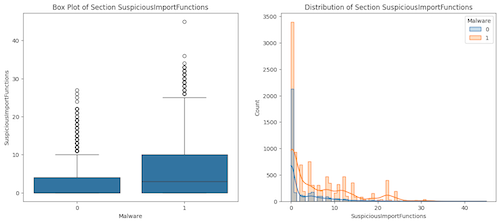
Because it wouldn’t be a ML article without a boxplot sneaking itself in somewhere lets now take a look at how a single field or feature relates to whether the sample is malware or benign:
 1import matplotlib.pyplot as plt
 2import seaborn as sns
 3# 1. Create a temporary DataFrame that brings X and y back together for plotting
 4plot_data = X_train.copy()
 5plot_data['Malware'] = y_train
 6
 7plt.figure(figsize=(15, 6))
 8# 2. Create the Box Plot on the left of suspicious import functions
 9plt.subplot(1, 2, 1)
10sns.boxplot(x='Malware', y='SuspiciousImportFunctions', data=plot_data)
11plt.title('Box Plot of Section SuspiciousImportFunctions')
12# 3. Create the Distribution Plot on the right of suspicious import functions
13plt.subplot(1, 2, 2)
14sns.histplot(data=plot_data, x='SuspiciousImportFunctions', hue='Malware', kde=True, element="step")
15plt.title('Distribution of Section SuspiciousImportFunctions')
16plt.show()
Rather unsurprisingly we see a correlation between number of suspicious import functions and a sample being malware! We could in theory stop here and call it a day making the assessment if a file ha more than X number of Suspicious Import functions it’t malware. But hopefully we can see immediate flaws in that, really we want to use many more data points to make a more accurate determination..
So to do that lets take the top most and bottom most corresponding correlations for all of the available features and see what bubbles up to the top or sinks to the bottom. These will hopefully be features that can be used to correlate strongly in combination with each other to determine the maliciousness of a file.
 1# 1. Create a new dataframe with ONLY numeric columns
 2numeric_X_train = X_train.select_dtypes(include=['number'])
 3# 2. Calculate correlations on that numeric data
 4correlations = numeric_X_train.corrwith(y_train).sort_values(ascending=False)
 5# 3. Show the strongest positive and negative correlations
 6print("--- Top Positive Correlations (Indicates Malware) ---")
 7print(correlations.head(15))
 8
 9print("\n--- Top Negative Correlations (Indicates Benign) ---")
10print(correlations.tail(10))
— Top Positive Correlations (Indicates Malware) —
SectionMaxChar 0.399776
SizeOfStackReserve 0.247231
SuspiciousImportFunctions 0.215623
DllCharacteristics 0.196971
e_maxalloc 0.190034
FileAlignment 0.168689
MinorLinkerVersion 0.145703
CheckSum 0.136488
NumberOfSections 0.113213
SectionsLength 0.113145
SizeOfHeapReserve 0.085310
e_lfanew 0.081512
SuspiciousNameSection 0.057701
SectionMaxPointerData 0.045652
e_oeminfo 0.043394
— Top Negative Correlations (Indicates Benign) —
Subsystem -0.498877
MajorSubsystemVersion -0.604873.
e_magic NaN
SectionMaxEntropy NaN
SectionMaxRawsize NaN
SectionMaxVirtualsize NaN
SectionMinPhysical NaN
SectionMinVirtual NaN
SectionMinPointerData NaN
SectionMainChar NaN
The Importance of Feature Selection
As we can see quite a few values came back with NaN (Not a Number). Unfortunately we have some fields where every single value is 0 like SectionMaxEntropy and SectionMaxRawsize, these can be dropped as they will not add any value.
In other cases like e_magic this is because every valid PE file starts with the same magic bytes (0x5A4D). Since the value never changes, therefore can also be dropped. Having an understanding of your data is really paramount to getting a good result.
We have also some very strong features but they potentially could be leading us astray.. Let’s have a ponder about what some these features actually represent:
The Problem Children:
MinorOperatingSystemVersion: Older required OS versionMajorOperatingSystemVersion: Older required OS versionTimeDateStamp: When the file was compiled
These features are highly correlated with malware in this dataset, but ** all for the wrong reasons**. The dataset likely contains older malware samples that naturally targeted older Windows versions common at the time. The model is learning “old = malicious” rather than actual malicious behavior. This is why feature selection is such an important step as the old Garbage in Garbage out adage goes.
Not to put too fine a point on the matter but if I deployed this model:
- Modern malware targeting Windows 11 > Classified as benign
- Legitimate old software > Classified as malware
Solutionising:
So what I ended up doing was retraining the model after removing these temporal features:
# Remove features that create temporal bias
cols_to_drop = ['MinorOperatingSystemVersion',
                'MajorOperatingSystemVersion',
                'TimeDateStamp']
X_train_refined = numeric_X_train.drop(columns=cols_to_drop, errors='ignore')
X_test_refined = numeric_X_test.drop(columns=cols_to_drop, errors='ignore')

# Retrain on more robust features
rfc_refined = RandomForestClassifier(random_state=42)
rfc_refined.fit(X_train_refined, y_train)
High feature importance doesn’t automatically mean good features. It’s super important to consider: “Is this correlation meaningful, or is it a dataset artifact?” This is where combining ML knowledge with malware analysis expertise becomes essential.
Training Random Forest
I’ve decided to use Random Forest as a Classifier. Largely due to having some familiarity with it and it being a simple effective “white box” model which we can interrogate the weights of the parameters to understand the results we are getting. The theory behind the classifier is going beyond the scope of this article but to put it simply Random Forest is an “ensemble method” which randomly splits up subsets of features and generates trees based on those subsets then aggregates the multiple outputs into a single result. They can be used for regression or classification problems, the latter is what we are attempting to achieve.
Where as a decision tree is a chain of if/else statements, Random Forest is less susceptible to over fitting since essentially rather than end up with a structure that perfectly fits your training data like in a Decision Tree the random forests random nature helps generalize the model. So it may be worse at predicting the Training Set it should be better with the Test set and real life data.
 1from sklearn.ensemble import RandomForestClassifier
 2
 3# 1. Initialize the model
 4# random_state=42 helps ensure we get the same results if we run this again
 5# I picked some hyper params, if this was a real project we could tweak these to get a better result
 6rfc = RandomForestClassifier(
 7    n_estimators=500,
 8    max_depth=30,
 9    min_samples_split=10,
10    class_weight='balanced',
11    random_state=42
12)
13
14# 2. Fit (train) the model
15print("Training the model...")
16rfc.fit(numeric_X_train, y_train)
17print("Training complete!")
18
19numeric_X_test = X_test.select_dtypes(include=['number'])
20
21# Ensure exact same columns in exact same order
22numeric_X_test = X_test[numeric_X_train.columns]
23
24# Generate predictions
25y_pred = rfc.predict(numeric_X_test)
26
27print("Predictions generated!")
Analysing the training results
 1from sklearn.metrics import confusion_matrix
 2# 1. Calculate the matrix
 3cm = confusion_matrix(y_test, y_pred)
 4# 2. Plotting as a heatmap
 5plt.figure(figsize=(8, 6))
 6sns.heatmap(cm, annot=True, fmt='d', cmap='Blues',
 7            xticklabels=['Predicted Benign', 'Predicted Malware'],
 8            yticklabels=['Actual Benign', 'Actual Malware'])
 9plt.ylabel('Actual')
10plt.xlabel('Predicted')
11plt.title('Confusion Matrix')
12plt.show()
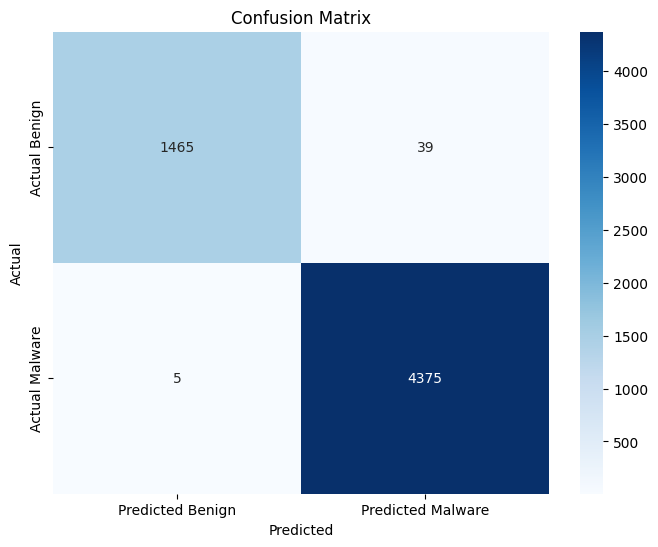
An excellent result, lets wrap up there and pat ourselves on the back not worrying about if it works in “production”.
One of the biggest bug bears of Cybersecurity Analysts, which is especially true with any black box machine learning is not being able to determine what features actually lead a detection to firing. Vendors often hand wave this away, but having never worked in or with a SOC where the True Positive percentage is higher than False Positive / Benign Positive I think it’s more than fair for an analyst to want to understand why a detection mechanism thinks something is malicious.
Not all types of machine learning can do this Neural Networks from my understanding are pretty impenetrable. But in this case we can look at the importance per feature to try to understand what features are pushing the model to a decision.
 1import pandas as pd
 2import matplotlib.pyplot as plt
 3import seaborn as sns
 4# 1. Get the importance scores from the trained model
 5importances = rfc.feature_importances_
 6# 2. Create a DataFrame to map scores to column names
 7# We use numeric_X_train.columns to ensure we match the right names
 8feature_importance_df = pd.DataFrame({
 9    'Feature': numeric_X_train.columns,
10    'Importance': importances
11})
12
13# 3. Sort by importance (highest on top)
14feature_importance_df = feature_importance_df.sort_values(by='Importance', ascending=False)
15
16# 4. Display the Top 10 as a table
17print("--- Top 10 Most Important Features ---")
18print(feature_importance_df.head(10))
19
20# 5. Visualise the Top 10
21plt.figure(figsize=(10, 6))
22sns.barplot(x='Importance', y='Feature', data=feature_importance_df.head(10))
23plt.title('Top 10 Features for Malware Detection')
24plt.show()
— Top 10 Most Important Features —
Feature Importance
36 MinorOperatingSystemVersion 0.090196
25 MajorLinkerVersion 0.085131
39 MajorSubsystemVersion 0.084642
46 SizeOfStackReserve 0.073966
19 TimeDateStamp 0.061142
32 ImageBase 0.057009
23 Characteristics 0.055775
35 MajorOperatingSystemVersion 0.046653
44 Subsystem 0.044585
40 MinorSubsystemVersion 0.037700
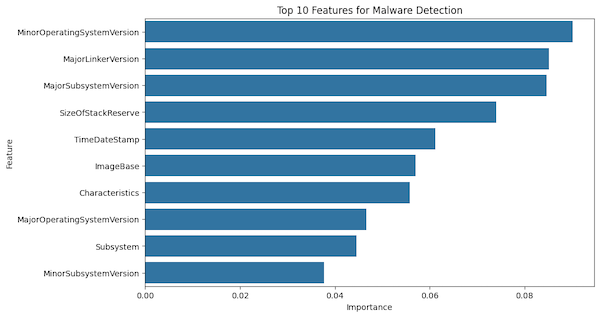
Interesting, it turns out that three of the most important features are all version based. This is where domain knowledge comes in very handy and hopefully my plan to develop meaningful skill and knowledge in both ML and Malware analysis will start to produce some value. Often malware authors really want to ensure that they can infect older systems. If we refer to window documentation we see:
MinorOperatingSystemVersion - The minor version number of the required operating system.
So we could draw the conclusion that malware often uses older MinorOperatingSystemVersion requirements to target old versions of windows. However this could also be that the dataset just had a lot of old malware samples in it rather than modern ones. This is where having a dataset you know exactly what each sample’s providence is greatly will increase your ability to get more accurate results.
The other value to pick out is TimeDateStamp which is when the file was created potentially supporting the hypothesis that the malware samples are older? Either way before moving onto the next step I actually removed some of these feature and re-trained the model on a smaller subset of features which I was confident would lead to more TP results.
Operationalisation (kinda)
One major issue highlighted during the Operationalization phase is “Training-Serving Skew”. The Kaggle dataset contains derived features like SuspiciousImportFunctions, but because it’s a “black box” dataset, we unfortunately don’t have the source code for how that count was calculated.
In my script, I had to approximate this feature by compiling my own list of suspicious API calls. If the dataset creator used a different list (or different matching logic), my script’s ‘5 suspicious imports’ might mean something totally different to the model than the dataset’s ‘5 suspicious imports.’
This is a critical limitation of using pre-computed datasets for end-to-end projects. I plan to fix this by generating my own dataset from scratch. For now, however, we will suspend disbelief and assume my list approximates theirs closely enough to function.
That being said this is probably the step i’ve really never reached before when doing ML projects. Up to this point the whole ML process is mostly academic in nature. It’s interesting to know this model can accurately catch X% of malware samples from the original training data but can it be:
a) turned into something useful
b) actually work with real world data and use cases
So this next python script is attempting to do just that. We are using the pefile library to extract features from an actual executable passed to it with command line arguments. The next important step is we need to extract the same features the model was trained on which in our case means also calculating the files entropy.
Needless to say this isn’t the first script I wrote to do this the start was very hacky and just about worked. Since then it’s been iterated on to make it actually work properly and to make it more readable using our good friend Claude.
  1#!/usr/bin/env python3
  2"""
  3PE Malware Detection Script
  4Extracts 74 features required by the trained model
  5
  6Note: The model was trained WITHOUT temporal features (OS versions, TimeDateStamp)
  7to prevent temporal bias. While these show high correlation in the dataset, they
  8represent when malware was created rather than inherent malicious characteristics.
  9
 10Feature Categories:
 111. DOS_HEADER (17 features) - Legacy DOS compatibility header
 122. FILE_HEADER (6 features) - COFF file header
 133. OPTIONAL_HEADER (24 features) - PE-specific header
 144. Section Statistics (15 features) - Calculated from section table
 155. Behavioral Analysis (2 features) - Suspicious patterns
 166. Directory Entries (8 features) - Data directory presence/size
 177. Missing OPTIONAL_HEADER (2 features) - Magic number
 18"""
 19
 20import sys
 21import os
 22import pickle
 23import pefile
 24import pandas as pd
 25import numpy as np
 26import warnings
 27from typing import Dict, Tuple, Optional, List
 28
 29# Suppress warnings
 30warnings.filterwarnings("ignore")
 31
 32# ============================================================================
 33# SUSPICIOUS INDICATORS
 34# ============================================================================
 35
 36SUSPICIOUS_IMPORTS = {
 37    # Process manipulation
 38    'VirtualAlloc', 'VirtualAllocEx', 'VirtualProtect', 'VirtualProtectEx',
 39    'WriteProcessMemory', 'ReadProcessMemory', 'CreateRemoteThread',
 40    'OpenProcess', 'TerminateProcess', 'GetProcAddress', 'LoadLibraryA',
 41    'LoadLibraryW', 'LoadLibraryExA', 'LoadLibraryExW',
 42
 43    # Code injection
 44    'NtQueueApcThread', 'QueueUserAPC', 'SetWindowsHookEx', 'RtlCreateUserThread',
 45    'NtCreateThreadEx', 'CreateThread', 'ResumeThread', 'SuspendThread',
 46
 47    # Memory manipulation
 48    'RtlMoveMemory', 'memcpy', 'NtWriteVirtualMemory', 'NtReadVirtualMemory',
 49    'NtAllocateVirtualMemory', 'NtProtectVirtualMemory',
 50
 51    # Debugging/Anti-analysis
 52    'IsDebuggerPresent', 'CheckRemoteDebuggerPresent', 'NtQueryInformationProcess',
 53    'OutputDebugStringA', 'OutputDebugStringW', 'DebugActiveProcess',
 54
 55    # Registry manipulation
 56    'RegOpenKeyExA', 'RegOpenKeyExW', 'RegSetValueExA', 'RegSetValueExW',
 57    'RegCreateKeyExA', 'RegCreateKeyExW', 'RegDeleteKeyA', 'RegDeleteKeyW',
 58
 59    # File operations
 60    'CreateFileA', 'CreateFileW', 'WriteFile', 'ReadFile', 'DeleteFileA',
 61    'DeleteFileW', 'MoveFileA', 'MoveFileW', 'CopyFileA', 'CopyFileW',
 62
 63    # Network operations
 64    'WSAStartup', 'socket', 'connect', 'send', 'recv', 'InternetOpenA',
 65    'InternetOpenW', 'InternetOpenUrlA', 'InternetOpenUrlW', 'HttpSendRequestA',
 66    'HttpSendRequestW', 'URLDownloadToFileA', 'URLDownloadToFileW',
 67
 68    # Cryptography
 69    'CryptEncrypt', 'CryptDecrypt', 'CryptAcquireContextA', 'CryptAcquireContextW',
 70    'CryptCreateHash', 'CryptHashData', 'CryptDeriveKey',
 71
 72    # Privilege escalation
 73    'AdjustTokenPrivileges', 'OpenProcessToken', 'LookupPrivilegeValueA',
 74    'LookupPrivilegeValueW', 'ImpersonateLoggedOnUser',
 75
 76    # Service manipulation
 77    'CreateServiceA', 'CreateServiceW', 'OpenServiceA', 'OpenServiceW',
 78    'StartServiceA', 'StartServiceW', 'ControlService', 'DeleteService',
 79
 80    # Keylogging
 81    'GetAsyncKeyState', 'GetKeyState', 'GetForegroundWindow', 'SetWindowsHookExA',
 82    'SetWindowsHookExW', 'CallNextHookEx',
 83
 84    # Evasion
 85    'Sleep', 'GetTickCount', 'GetSystemTime', 'GetLocalTime',
 86}
 87
 88SUSPICIOUS_SECTION_NAMES = {
 89    '.upx', 'upx0', 'upx1', 'upx2',  # UPX packer
 90    '.aspack', '.adata', '.asdata',  # ASPack packer
 91    '.petite', '.pec1', '.pec2',     # PEtite packer
 92    '.neolite',                       # Neolite packer
 93    '.themida', '.winlicense',        # Themida/Winlicense
 94    '.vmprotect',                     # VMProtect
 95    '.mpress',                        # MPRESS
 96    '.packed', '.pdata',              # Generic packed indicators
 97    'text', 'CODE', 'DATA',           # Non-standard naming (missing dot)
 98}
 99
100
101# ============================================================================
102# RESOURCE LOADING
103# ============================================================================
104
105def load_resources() -> Tuple[object, List[str]]:
106    """
107    Load the trained model and the column list.
108
109    Returns:
110        Tuple of (model, columns list)
111
112    Raises:
113        FileNotFoundError: If model files are missing
114        Exception: If model files are corrupted
115    """
116    try:
117        base_path = os.path.dirname(os.path.abspath(__file__))
118
119        model_path = os.path.join(base_path, 'malware_detector.pkl')
120        if not os.path.exists(model_path):
121            raise FileNotFoundError(f"Model file not found: {model_path}")
122
123        with open(model_path, 'rb') as f:
124            model = pickle.load(f)
125
126        columns_path = os.path.join(base_path, 'model_columns.pkl')
127        if not os.path.exists(columns_path):
128            raise FileNotFoundError(f"Columns file not found: {columns_path}")
129
130        with open(columns_path, 'rb') as f:
131            columns = pickle.load(f)
132
133        # Validate model has required methods
134        if not hasattr(model, 'predict') or not hasattr(model, 'predict_proba'):
135            raise ValueError("Loaded object is not a valid classifier model")
136
137        if not hasattr(model, 'feature_importances_'):
138            print("Warning: Model does not have feature_importances_ attribute")
139
140        print(f"[+] Loaded model expecting {len(columns)} features")
141        return model, columns
142
143    except FileNotFoundError as e:
144        print(f"[!] Error: {e}")
145        sys.exit(1)
146    except Exception as e:
147        print(f"[!] Error loading model files: {e}")
148        sys.exit(1)
149
150
151# ============================================================================
152# CATEGORY 1: DOS_HEADER EXTRACTION (17 features)
153# ============================================================================
154
155def extract_dos_header(pe: pefile.PE) -> Dict[str, int]:
156    """
157    Extract DOS header features (e_* fields).
158
159    The DOS header is a legacy structure from MS-DOS compatibility.
160    Malware often manipulates these fields for evasion.
161
162    Args:
163        pe: pefile.PE object
164
165    Returns:
166        Dictionary with 17 DOS header features
167    """
168    dos = {}
169
170    if hasattr(pe, 'DOS_HEADER'):
171        dh = pe.DOS_HEADER
172
173        dos['e_magic'] = dh.e_magic          # Magic number (should be 0x5A4D = "MZ")
174        dos['e_cblp'] = dh.e_cblp            # Bytes on last page of file
175        dos['e_cp'] = dh.e_cp                # Pages in file
176        dos['e_crlc'] = dh.e_crlc            # Relocations
177        dos['e_cparhdr'] = dh.e_cparhdr      # Size of header in paragraphs
178        dos['e_minalloc'] = dh.e_minalloc    # Minimum extra paragraphs needed
179        dos['e_maxalloc'] = dh.e_maxalloc    # Maximum extra paragraphs needed
180        dos['e_ss'] = dh.e_ss                # Initial (relative) SS value
181        dos['e_sp'] = dh.e_sp                # Initial SP value
182        dos['e_csum'] = dh.e_csum            # Checksum
183        dos['e_ip'] = dh.e_ip                # Initial IP value
184        dos['e_cs'] = dh.e_cs                # Initial (relative) CS value
185        dos['e_lfarlc'] = dh.e_lfarlc        # File address of relocation table
186        dos['e_ovno'] = dh.e_ovno            # Overlay number
187        dos['e_oemid'] = dh.e_oemid          # OEM identifier
188        dos['e_oeminfo'] = dh.e_oeminfo      # OEM information
189        dos['e_lfanew'] = dh.e_lfanew        # File address of new exe header (PE header offset)
190
191    return dos
192
193
194# ============================================================================
195# CATEGORY 2: FILE_HEADER EXTRACTION (6 features)
196# ============================================================================
197
198def extract_file_header(pe: pefile.PE) -> Dict[str, int]:
199    """
200    Extract COFF file header features.
201
202    The FILE_HEADER contains critical metadata about the PE file structure.
203
204    Args:
205        pe: pefile.PE object
206
207    Returns:
208        Dictionary with 6 FILE_HEADER features
209    """
210    fh = {}
211
212    if hasattr(pe, 'FILE_HEADER'):
213        file_hdr = pe.FILE_HEADER
214
215        # Machine type (e.g., 0x14c = x86, 0x8664 = x64)
216        fh['Machine'] = file_hdr.Machine
217
218        # Number of sections in the file
219        fh['NumberOfSections'] = file_hdr.NumberOfSections
220
221        # Pointer to COFF symbol table (usually 0 for executables)
222        fh['PointerToSymbolTable'] = file_hdr.PointerToSymbolTable
223
224        # Number of entries in symbol table
225        fh['NumberOfSymbols'] = file_hdr.NumberOfSymbols
226
227        # Size of optional header
228        fh['SizeOfOptionalHeader'] = file_hdr.SizeOfOptionalHeader
229
230        # File characteristics (flags like executable, DLL, etc.)
231        # Common flags: 0x0002 = EXECUTABLE_IMAGE, 0x2000 = DLL
232        fh['Characteristics'] = file_hdr.Characteristics
233
234    return fh
235
236
237# ============================================================================
238# CATEGORY 3: OPTIONAL_HEADER EXTRACTION (24 features)
239# ============================================================================
240
241def extract_optional_header(pe: pefile.PE) -> Dict[str, int]:
242    """
243    Extract OPTIONAL_HEADER features.
244
245    Despite the name, this header is mandatory for executables.
246    Contains crucial information about how to load and execute the PE.
247
248    Args:
249        pe: pefile.PE object
250
251    Returns:
252        Dictionary with 26 OPTIONAL_HEADER features (including Magic)
253    """
254    opt = {}
255
256    if hasattr(pe, 'OPTIONAL_HEADER'):
257        oh = pe.OPTIONAL_HEADER
258
259        # Magic number (0x10b = PE32, 0x20b = PE32+/64-bit)
260        opt['Magic'] = oh.Magic
261
262        # Linker version
263        opt['MajorLinkerVersion'] = oh.MajorLinkerVersion
264        opt['MinorLinkerVersion'] = oh.MinorLinkerVersion
265
266        # Code and data sizes
267        opt['SizeOfCode'] = oh.SizeOfCode
268        opt['SizeOfInitializedData'] = oh.SizeOfInitializedData
269        opt['SizeOfUninitializedData'] = oh.SizeOfUninitializedData
270
271        # Entry point RVA (Relative Virtual Address)
272        opt['AddressOfEntryPoint'] = oh.AddressOfEntryPoint
273
274        # Base addresses
275        opt['BaseOfCode'] = oh.BaseOfCode
276        opt['ImageBase'] = oh.ImageBase
277
278        # Alignment values
279        opt['SectionAlignment'] = oh.SectionAlignment  # In memory
280        opt['FileAlignment'] = oh.FileAlignment        # On disk
281
282        # Version information
283        opt['MajorImageVersion'] = oh.MajorImageVersion
284        opt['MinorImageVersion'] = oh.MinorImageVersion
285        opt['MajorSubsystemVersion'] = oh.MajorSubsystemVersion
286        opt['MinorSubsystemVersion'] = oh.MinorSubsystemVersion
287
288        # Image sizes
289        opt['SizeOfHeaders'] = oh.SizeOfHeaders
290        opt['CheckSum'] = oh.CheckSum
291        opt['SizeOfImage'] = oh.SizeOfImage
292
293        # Subsystem (3 = Console, 2 = GUI, etc.)
294        opt['Subsystem'] = oh.Subsystem
295
296        # DLL characteristics (ASLR, DEP, etc.)
297        opt['DllCharacteristics'] = oh.DllCharacteristics
298
299        # Stack and heap sizes
300        opt['SizeOfStackReserve'] = oh.SizeOfStackReserve
301        opt['SizeOfStackCommit'] = oh.SizeOfStackCommit
302        opt['SizeOfHeapReserve'] = oh.SizeOfHeapReserve
303        opt['SizeOfHeapCommit'] = oh.SizeOfHeapCommit
304
305        # Loader flags (obsolete but may be set)
306        opt['LoaderFlags'] = oh.LoaderFlags
307
308        # Number of data directories
309        opt['NumberOfRvaAndSizes'] = oh.NumberOfRvaAndSizes
310
311    return opt
312
313
314# ============================================================================
315# CATEGORY 4: SECTION STATISTICS (15 features)
316# ============================================================================
317
318def extract_section_statistics(pe: pefile.PE) -> Dict[str, float]:
319    """
320    Calculate statistical features from PE sections.
321
322    Sections contain code, data, resources, etc. Unusual section
323    characteristics often indicate packing or malicious modifications.
324
325    Args:
326        pe: pefile.PE object
327
328    Returns:
329        Dictionary with 15 section-related features
330    """
331    sections = {}
332
333    if not hasattr(pe, 'sections') or len(pe.sections) == 0:
334        # No sections - highly unusual, fill with zeros
335        sections['SectionsLength'] = 0
336        sections['SectionMinEntropy'] = 0
337        sections['SectionMaxEntropy'] = 0
338        sections['SectionMinRawsize'] = 0
339        sections['SectionMaxRawsize'] = 0
340        sections['SectionMinVirtualsize'] = 0
341        sections['SectionMaxVirtualsize'] = 0
342        sections['SectionMaxPhysical'] = 0
343        sections['SectionMinPhysical'] = 0
344        sections['SectionMaxVirtual'] = 0
345        sections['SectionMinVirtual'] = 0
346        sections['SectionMaxPointerData'] = 0
347        sections['SectionMinPointerData'] = 0
348        sections['SectionMaxChar'] = 0
349        sections['SectionMainChar'] = 0
350        return sections
351
352    # Collect section metrics
353    entropies = []
354    raw_sizes = []
355    virtual_sizes = []
356    physical_addresses = []
357    virtual_addresses = []
358    pointer_to_raw_data = []
359    characteristics = []
360
361    for section in pe.sections:
362        # Entropy (high entropy = encrypted/packed)
363        entropies.append(section.get_entropy())
364
365        # Raw size (on disk)
366        raw_sizes.append(section.SizeOfRawData)
367
368        # Virtual size (in memory)
369        virtual_sizes.append(section.Misc_VirtualSize)
370
371        # Physical address (deprecated but sometimes set)
372        if hasattr(section, 'Misc_PhysicalAddress'):
373            physical_addresses.append(section.Misc_PhysicalAddress)
374        else:
375            physical_addresses.append(0)
376
377        # Virtual address (RVA where section is loaded)
378        virtual_addresses.append(section.VirtualAddress)
379
380        # Pointer to raw data (file offset)
381        pointer_to_raw_data.append(section.PointerToRawData)
382
383        # Characteristics (flags: readable, writable, executable, etc.)
384        characteristics.append(section.Characteristics)
385
386    # Calculate statistics
387    sections['SectionsLength'] = len(pe.sections)
388
389    # Entropy statistics
390    sections['SectionMinEntropy'] = min(entropies) if entropies else 0
391    sections['SectionMaxEntropy'] = max(entropies) if entropies else 0
392
393    # Size statistics
394    sections['SectionMinRawsize'] = min(raw_sizes) if raw_sizes else 0
395    sections['SectionMaxRawsize'] = max(raw_sizes) if raw_sizes else 0
396    sections['SectionMinVirtualsize'] = min(virtual_sizes) if virtual_sizes else 0
397    sections['SectionMaxVirtualsize'] = max(virtual_sizes) if virtual_sizes else 0
398
399    # Physical address statistics
400    sections['SectionMaxPhysical'] = max(physical_addresses) if physical_addresses else 0
401    sections['SectionMinPhysical'] = min(physical_addresses) if physical_addresses else 0
402
403    # Virtual address statistics
404    sections['SectionMaxVirtual'] = max(virtual_addresses) if virtual_addresses else 0
405    sections['SectionMinVirtual'] = min(virtual_addresses) if virtual_addresses else 0
406
407    # Pointer to raw data statistics
408    sections['SectionMaxPointerData'] = max(pointer_to_raw_data) if pointer_to_raw_data else 0
409    sections['SectionMinPointerData'] = min(pointer_to_raw_data) if pointer_to_raw_data else 0
410
411    # Characteristics statistics
412    sections['SectionMaxChar'] = max(characteristics) if characteristics else 0
413    # Note: SectionMainChar likely means "most common characteristics"
414    # Using the first section's characteristics as heuristic
415    sections['SectionMainChar'] = characteristics[0] if characteristics else 0
416
417    return sections
418
419
420# ============================================================================
421# CATEGORY 5: BEHAVIORAL ANALYSIS (2 features)
422# ============================================================================
423
424def extract_behavioral_features(pe: pefile.PE) -> Dict[str, int]:
425    """
426    Analyze behavioral indicators of maliciousness.
427
428    These features look for suspicious patterns in imports and section names
429    that are common in malware.
430
431    Args:
432        pe: pefile.PE object
433
434    Returns:
435        Dictionary with 2 behavioral features
436    """
437    behavioral = {}
438
439    # Feature 1: Count suspicious import functions
440    suspicious_import_count = 0
441
442    if hasattr(pe, 'DIRECTORY_ENTRY_IMPORT'):
443        for entry in pe.DIRECTORY_ENTRY_IMPORT:
444            for imp in entry.imports:
445                if imp.name:
446                    # Decode bytes to string if necessary
447                    import_name = imp.name.decode('utf-8') if isinstance(imp.name, bytes) else imp.name
448                    if import_name in SUSPICIOUS_IMPORTS:
449                        suspicious_import_count += 1
450
451    behavioral['SuspiciousImportFunctions'] = suspicious_import_count
452
453    # Feature 2: Check for suspicious section names
454    suspicious_section_count = 0
455
456    if hasattr(pe, 'sections'):
457        for section in pe.sections:
458            # Get section name and clean it
459            section_name = section.Name.decode('utf-8', errors='ignore').rstrip('\x00').lower()
460
461            # Check against known packer/suspicious names
462            if section_name in SUSPICIOUS_SECTION_NAMES:
463                suspicious_section_count += 1
464
465            # Also check for sections without leading dot (non-standard)
466            if section_name and not section_name.startswith('.'):
467                suspicious_section_count += 1
468
469    behavioral['SuspiciousNameSection'] = suspicious_section_count
470
471    return behavioral
472
473
474# ============================================================================
475# CATEGORY 6: DIRECTORY ENTRIES (8 features)
476# ============================================================================
477
478def extract_directory_entries(pe: pefile.PE) -> Dict[str, int]:
479    """
480    Extract data directory presence and size information.
481
482    Data directories point to important structures like imports, exports,
483    resources, etc. Their presence and size can indicate malicious behavior.
484
485    Args:
486        pe: pefile.PE object
487
488    Returns:
489        Dictionary with 8 directory entry features
490    """
491    directories = {}
492
493    # Initialize all to 0
494    directories['DirectoryEntryImport'] = 0
495    directories['DirectoryEntryImportSize'] = 0
496    directories['DirectoryEntryExport'] = 0
497    directories['ImageDirectoryEntryExport'] = 0
498    directories['ImageDirectoryEntryImport'] = 0
499    directories['ImageDirectoryEntryResource'] = 0
500    directories['ImageDirectoryEntryException'] = 0
501    directories['ImageDirectoryEntrySecurity'] = 0
502
503    if not hasattr(pe, 'OPTIONAL_HEADER'):
504        return directories
505
506    # Check if DATA_DIRECTORY exists
507    if not hasattr(pe.OPTIONAL_HEADER, 'DATA_DIRECTORY'):
508        return directories
509
510    # Data directory indices (from PE specification)
511    # 0 = Export, 1 = Import, 2 = Resource, 3 = Exception, 4 = Security, etc.
512    data_dirs = pe.OPTIONAL_HEADER.DATA_DIRECTORY
513
514    # DirectoryEntryExport (index 0)
515    if len(data_dirs) > 0:
516        directories['DirectoryEntryExport'] = 1 if data_dirs[0].VirtualAddress != 0 else 0
517        directories['ImageDirectoryEntryExport'] = data_dirs[0].Size
518
519    # DirectoryEntryImport (index 1)
520    if len(data_dirs) > 1:
521        directories['DirectoryEntryImport'] = 1 if data_dirs[1].VirtualAddress != 0 else 0
522        directories['DirectoryEntryImportSize'] = data_dirs[1].Size
523        directories['ImageDirectoryEntryImport'] = data_dirs[1].Size
524
525    # DirectoryEntryResource (index 2)
526    if len(data_dirs) > 2:
527        directories['ImageDirectoryEntryResource'] = data_dirs[2].Size
528
529    # DirectoryEntryException (index 3)
530    if len(data_dirs) > 3:
531        directories['ImageDirectoryEntryException'] = data_dirs[3].Size
532
533    # DirectoryEntrySecurity (index 4)
534    if len(data_dirs) > 4:
535        directories['ImageDirectoryEntrySecurity'] = data_dirs[4].Size
536
537    return directories
538
539
540# ============================================================================
541# MAIN FEATURE EXTRACTION
542# ============================================================================
543
544def extract_features(file_path: str, model_columns: List[str]) -> Optional[pd.DataFrame]:
545    """
546    Extract all 74 features from a PE file to match the model's schema.
547
548    Args:
549        file_path: Path to the PE file to analyze
550        model_columns: List of column names expected by the model
551
552    Returns:
553        DataFrame with extracted features, or None on error
554    """
555    try:
556        # Parse PE file
557        pe = pefile.PE(file_path, fast_load=False)
558
559        # Initialize feature dictionary
560        data = {}
561
562        # Extract all feature categories
563        print("[*] Extracting DOS_HEADER features...")
564        data.update(extract_dos_header(pe))
565
566        print("[*] Extracting FILE_HEADER features...")
567        data.update(extract_file_header(pe))
568
569        print("[*] Extracting OPTIONAL_HEADER features...")
570        data.update(extract_optional_header(pe))
571
572        print("[*] Extracting section statistics...")
573        data.update(extract_section_statistics(pe))
574
575        print("[*] Extracting behavioral features...")
576        data.update(extract_behavioral_features(pe))
577
578        print("[*] Extracting directory entries...")
579        data.update(extract_directory_entries(pe))
580
581        # Close PE file
582        pe.close()
583
584        # Create DataFrame with exact column order from model
585        features_df = pd.DataFrame([data], columns=model_columns)
586
587        # Fill any missing values with 0
588        features_df = features_df.fillna(0)
589
590        # Verify feature count
591        extracted_count = len([k for k in data.keys() if k in model_columns])
592        print(f"[+] Extracted {extracted_count}/{len(model_columns)} features")
593
594        if extracted_count < len(model_columns):
595            missing = set(model_columns) - set(data.keys())
596            print(f"[!] Warning: {len(missing)} features missing: {missing}")
597
598        return features_df
599
600    except pefile.PEFormatError as e:
601        print(f"[!] Error: Not a valid PE file - {e}")
602        return None
603    except Exception as e:
604        print(f"[!] Error parsing file: {e}")
605        import traceback
606        traceback.print_exc()
607        return None
608
609
610# ============================================================================
611# PREDICTION EXPLANATION
612# ============================================================================
613
614def explain_prediction(model: object, columns: List[str], input_data: pd.DataFrame, top_n: int = 10) -> None:
615    """
616    Display the top N features that influenced the model's decision.
617
618    Args:
619        model: Trained model with feature_importances_ attribute
620        columns: List of feature names
621        input_data: DataFrame with extracted features
622        top_n: Number of top features to display
623    """
624    # Check if model has feature importances
625    if not hasattr(model, 'feature_importances_'):
626        print("\n[!] Model does not support feature importance analysis")
627        return
628
629    # Get importance scores
630    importances = model.feature_importances_
631
632    # Sort by importance (descending)
633    indices = np.argsort(importances)[::-1]
634
635    print(f"\n" + "=" * 80)
636    print(f"FEATURE IMPORTANCE ANALYSIS: Top {top_n} Features Driving Decision")
637    print("=" * 80)
638    print(f"{'Rank':<6} {'Feature Name':<35} {'File Value':<15} {'Importance':<12}")
639    print("-" * 80)
640
641    for rank, idx in enumerate(indices[:top_n], 1):
642        feature_name = columns[idx]
643        importance_score = importances[idx]
644        file_value = input_data[feature_name].values[0]
645
646        print(f"{rank:<6} {feature_name:<35} {file_value:<15.2f} {importance_score:<12.6f}")
647
648    print("=" * 80)
649
650
651# ============================================================================
652# MAIN EXECUTION
653# ============================================================================
654
655def main():
656    """Main execution function."""
657
658    # Check command line arguments
659    if len(sys.argv) != 2:
660        print("Usage: python pe-extractor-corrected.py <path_to_file>")
661        print("\nExample:")
662        print("  python pe-extractor-corrected.py suspicious.exe")
663        sys.exit(1)
664
665    target_file = sys.argv[1]
666
667    # Validate file exists
668    if not os.path.exists(target_file):
669        print(f"[!] Error: File '{target_file}' not found.")
670        sys.exit(1)
671
672    # Load model and columns
673    print("[*] Loading model resources...")
674    model, columns = load_resources()
675
676    # Extract features
677    print(f"\n[*] Analyzing: {target_file}")
678    print("=" * 80)
679    input_data = extract_features(target_file, columns)
680
681    if input_data is None:
682        print("[!] Feature extraction failed. Cannot proceed with prediction.")
683        sys.exit(1)
684
685    # Make prediction
686    print("\n[*] Running classification...")
687    prediction = model.predict(input_data)[0]
688    probabilities = model.predict_proba(input_data)[0]
689
690    # Display results
691    print("\n" + "=" * 80)
692    print("CLASSIFICATION RESULT")
693    print("=" * 80)
694
695    if prediction == 1:
696        print("[!] VERDICT: MALWARE DETECTED")
697        print(f"    Malware Confidence: {probabilities[1]:.2%}")
698        print(f"    Benign Confidence:  {probabilities[0]:.2%}")
699    else:
700        print("[+] VERDICT: CLEAN FILE")
701        print(f"    Benign Confidence:  {probabilities[0]:.2%}")
702        print(f"    Malware Confidence: {probabilities[1]:.2%}")
703
704    print("=" * 80)
705
706    # Explain prediction
707    explain_prediction(model, columns, input_data, top_n=15)
708
709    print("\n[*] Analysis complete.")
710
711
712if __name__ == "__main__":
713    main()
It works
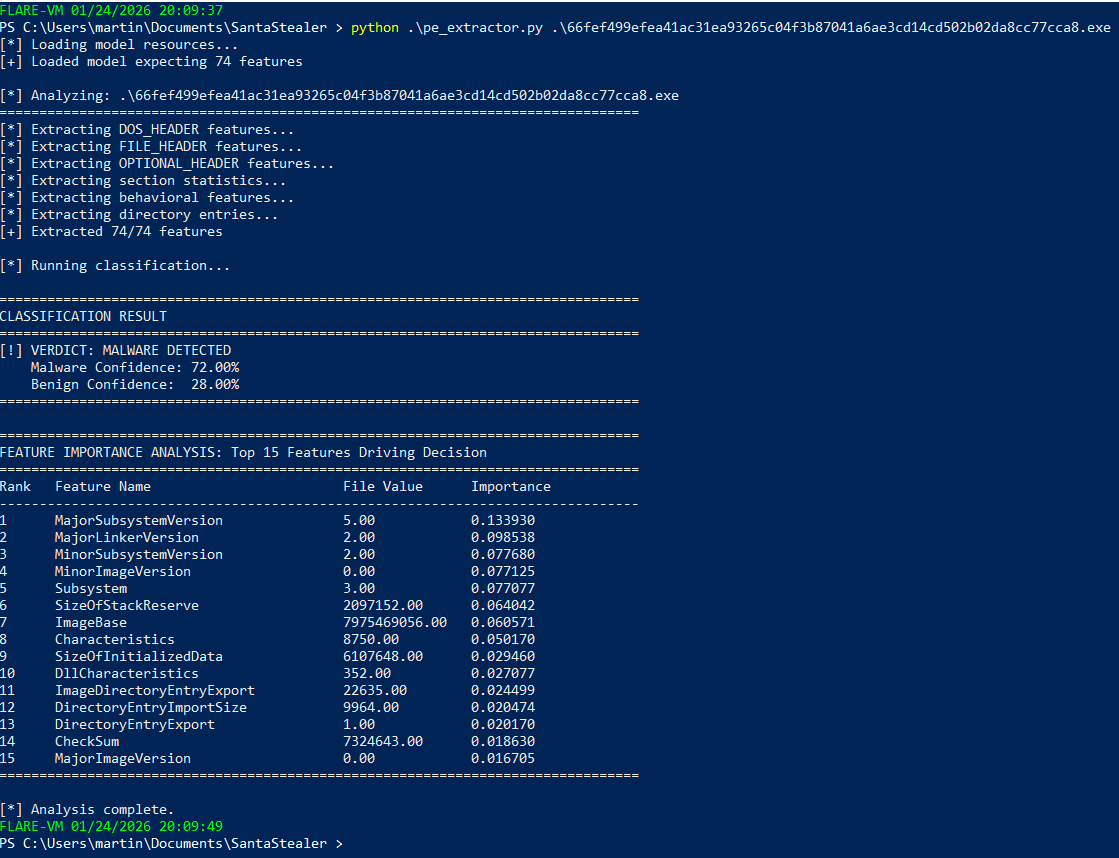
Let’s take this thing for a spin in my Malware Analysis VM. This first sample is something I was messing around with revese engineering over Christmas called Santa Stealer. It was pretty confidently able to correclty classify as malware.
It still works!
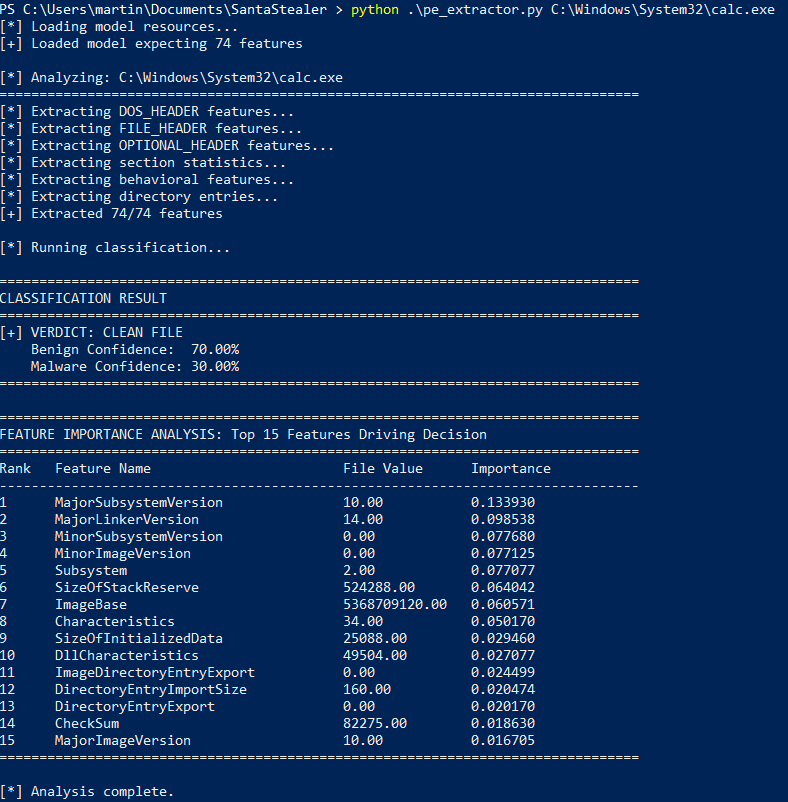
Next up time for everyones favourite classic calc.exe. This again was correctly classified as benign!
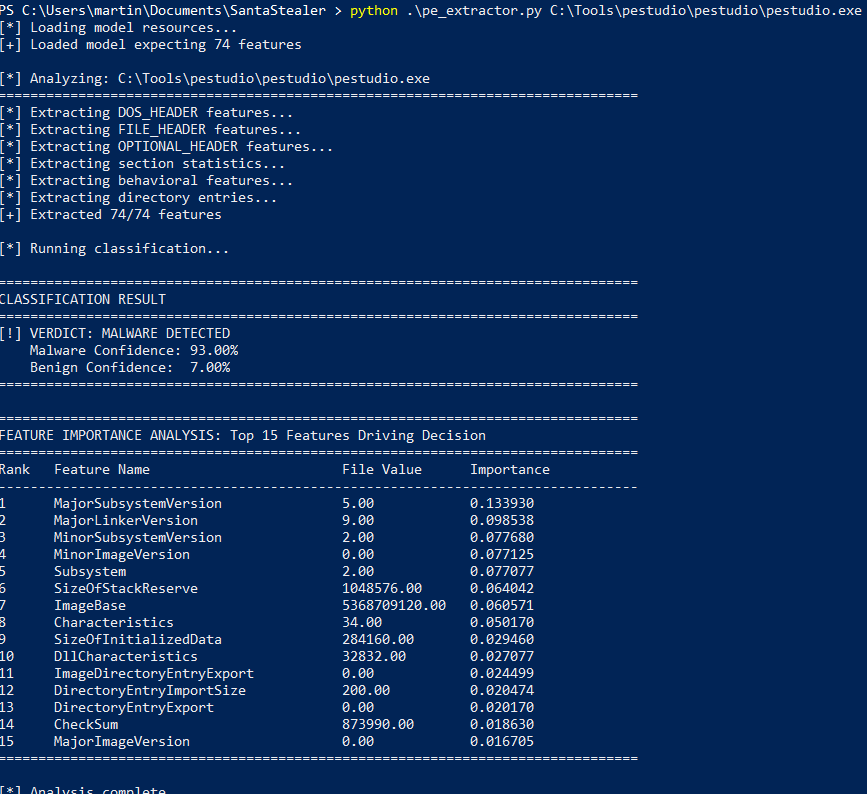
Annd it’s useless!
Unsuprisingly a hastily trained Random Forest model falls short. PEStudio for anyone who doesn’t spend too much time in their Malware Analysis VM is a fantastic tool for performing static analysis.
To cut the model some slack PEStudio does inhibit some malicious looking qualities due to the way it pulls out static features from files.
But as I probably said at the outset, the purpose of this whole endevour was exploration. Learning and finding out the shortcomings along the way, to then move onto bigger and better things which are more resiliant.
There is obviously a lot more we could do, extract strings perform hash lookups and more to get higher quality of data to train this rudementary engine on. Also I could build a better dataset, producing data for all windows binaries on a typical system would likely improve performance as well as looking at other facets like file signatures.
While these would be worthwhile if my aim was to create a more accurate detection tool, my aim is to dig deeper into ML so instead heres what I want to take this to in February!
Whats next?
To conclude, the point I really wanted to get across based off what I’ve learned so far is that building a proper understanding of the domain and the data you are working with is really imperitive. And secondarily that setting a goal to build something interesting put functionally pointless has tremendous value from a learning perspective.
Next month I want to dig into some totally new topics to me as most of the above was re-familiarisation:
- SHAP analysis
- XG Boost
- Explore how I can build my own dataset from scatch